Showing posts with label jade. Show all posts

4.11.2012

Nomination mobile - part 5


This post its a part of a series about creating an app with node.js and express for Facebook... this time for mobile browsers


Desktop version:


*NOTE: jqm = jquery mobile

Last post for this mobile series

Firs the erase part, lets update the "mscript.js" with this

$('#remove').click(function(ev){
    $.mobile.showPageLoadingMsg();
    ev.preventDefault();
    var uid = $(this).attr('uid');
    var details = $('#details');
    var nid = details.find('#attd').attr('nid');
    $.post("/nominations/eraseuser", { id: nid, user: 'eraseme' },
        function(data) {
            if (data){                    
                //get the row of the user and erase it
                $('.users').find('#'+uid).remove();
                var usersl = details.find('.users');
                usersl.listview('refresh');
            }else{
                showMsg('dashboard.error', 'dashboard.error_removing');
            }
            $.mobile.hidePageLoadingMsg();
        }
    ).error(function() { 
        $.mobile.hidePageLoadingMsg(); 
        showMsg('dashboard.error', 'dashboard.error_removing'); 
    }); 
});

And also the page to store the user id in the button:

a#remove(href="#", data-icon="minus", uid="#{user.id}") #{t('dashboard.remove_me')}

Simple, we just get the id of the user, we ge the details page and we search for the id of the nomination, send the data to the server and  if we don't have errors erase that row

God, now to refresh, lets do the following, first lets add the class "refresh" to all refresh buttons:

a.refresh(href="#", data-role="button", data-theme="b", data-icon="refresh") #{t('dashboard.refresh')}

And then add the functionality in the script

//refresh the list of nominations
$('.refresh').click(function (ev) {
    $.mobile.showPageLoadingMsg();
    ev.preventDefault();
    //get the actual page id
    var pageid = $.mobile.activePage.attr('id').split('-')[1];
    //erase the actual list
    var divider = $('#'+pageid).find('li')[0];
    $('#'+pageid).find('li').remove();
    $('#'+pageid).listview('refresh');
    //add the divider
    $('#'+pageid).append(divider);
    //reload the nominations
    loadNominations(pageid);
});

Get the id of the actual page, and then get the type on nomination the user is looking, then get the divider, erase the actual list, add again the divider, refresh and reload the nominations of that type

Good, easy, now lets update the routes to handle the request from small devices, lets update the file "routes/dashboard.js"

bt = new bowser(req);
if (bt.isMobile() || bt.isTablet()){
    res.redirect('/dashboardm');
}else{
    res.render('dashboard', 
        { 
            user: req.session.user, 
            error : req.param('error'), 
            type: 'dashboard', 
            invited: invited                
        });
}

We are checking for tablet or mobile and if so lets redirect them to the mobile version, with this any user can see the mobile version by updating the url

We are just missing to update the strings in the jade files or js to i18 strings, lets give that task as a homework for all, any doubt on doing that let me know

Thats it for the mobile verions, we have a nice version now quite interesting, lets announce it everywhere now, if you can please help me with some bugs or new stuff for the application, i may be missing a nice feature.

Next time we will try to do a job to run it daily and close the nominations already passed and send notifications in facebook to the users.

After that we will move this to phonegap to make it native for different platforms :)

Fork the code


Greetings

3.28.2012

Nomination mobile - part 4


This post its a part of a series about creating an app with node.js and express for Facebook... this time for mobile browsers


Desktop version:


*NOTE: jqm = jquery mobile

Now lets put the functionality for vote, delete and invite friends to the application

To start lets add a feature to the list of friends in the details of a nomination, when the user swipe left or right it will appear two buttons vote or delete, for that lets update "mscript.js", after add the user to the list we add (around line 150):

$('.users li').bind('swiperight swipeleft', swipe);

This will look for swipe function when the user swipe in any direction on any list item, lets add the function in the same file

function swipe(){
    // reference the just swiped list item
    var $li = $(this);
    // remove all buttons first
    $('.aDeleteBtn').remove();
    $('.aVoteBtn').remove();
    // create buttons and div container
 var $deleteBtn = $('<a>Delete</a>').attr({
   'class': 'aDeleteBtn ui-btn-up-r',
   'href': '#'
  });
    var $voteBtn = $('<a>Vote</a>').attr({
            'class': 'aVoteBtn ui-btn-up-bl',
   'href': '#'
  });
 // insert swipe div into list item
 $li.prepend($deleteBtn);
    $li.prepend($voteBtn);
    $deleteBtn.slideToggle();
    $voteBtn.slideToggle();
}

Here we take the li as a reference, first erase the buttons if they exist already, then we create 2 buttons which have 2 clases, 1 for reference only and the other one to give them style and the position, for that lets add them to the css

.aDeleteBtn, .aVoteBtn {
    -moz-border-radius: 5px;
 -webkit-border-radius: 5px;
 float: right;
 height: 15px;
 line-height: 15px;
 margin: 10px 10px 0 0;
 padding: 0.6em;
 position: absolute;
 right: 0;
 top: 0;
 z-index: 10;
    display: none;
}

.aDeleteBtn{
    right: 60px;
}

/* red color buttons */

.ui-btn-up-r { border: 1px solid #953403; background: #2567ab; font-weight: bold; color: #fff; cursor: pointer;  text-shadow: 0 -1px 1px #953403; text-decoration: none; background-image: -moz-linear-gradient(top, #ec4a0b, #ad390c); background-image: -webkit-gradient(linear,left top,left bottom,color-stop(0, #ec4a0b),color-stop(1, #ad390c));   -ms-filter: "progid:DXImageTransform.Microsoft.gradient(startColorStr='#ec4a0b', EndColorStr='#ad390c')"; }

.ui-btn-up-r a.ui-link-inherit { color: #fff; }

.ui-btn-hover-r { border: 1px solid #953403; background: #f15c22; font-weight: bold; color: #fff;  text-shadow: 0 -1px 1px #014D68; background-image: -moz-linear-gradient(top, #f15c22, #f15c22); text-decoration: none; background-image: -webkit-gradient(linear,left top,left bottom,color-stop(0, #f15c22),color-stop(1, #f15c22));   -ms-filter: "progid:DXImageTransform.Microsoft.gradient(startColorStr='#f15c22', EndColorStr='#f15c22')";  }

.ui-btn-hover-r a.ui-link-inherit { color: #fff; }

.ui-btn-down-r { border: 1px solid #225377; background: #79ae21; font-weight: bold; color: #fff; text-shadow: 0 -1px 1px #225377; background-image: -moz-linear-gradient(top, #bc770f, #e6590c); background-image: -webkit-gradient(linear,left top,left bottom,color-stop(0, #bc770f),color-stop(1, #e6590c));   -ms-filter: "progid:DXImageTransform.Microsoft.gradient(startColorStr='#bc770f', EndColorStr='#e6590c')"; }

.ui-btn-down-r a.ui-link-inherit { color: #fff; }

.ui-btn-up-r, .ui-btn-hover-r, .ui-btn-down-r { font-family: Helvetica, Arial, sans-serif; }

/* blue color buttons */

.ui-btn-up-bl { border: 1px solid #036596; background: #2567ab; font-weight: bold; color: #fff; cursor: pointer;  text-shadow: 0 -1px 1px #036596; text-decoration: none; background-image: -moz-linear-gradient(top, #2567ab, #036596); background-image: -webkit-gradient(linear,left top,left bottom,color-stop(0, #2567ab),color-stop(1, #036596));   -ms-filter: "progid:DXImageTransform.Microsoft.gradient(startColorStr='#2567ab', EndColorStr='#036596')"; }

.ui-btn-up-bl a.ui-link-inherit { color: #fff; }

.ui-btn-hover-bl { border: 1px solid #036596; background: #2567ab; font-weight: bold; color: #fff;  text-shadow: 0 -1px 1px #014D68; background-image: -moz-linear-gradient(top, #2567ab, #2567ab); text-decoration: none; background-image: -webkit-gradient(linear,left top,left bottom,color-stop(0, #2567ab),color-stop(1, #2567ab));   -ms-filter: "progid:DXImageTransform.Microsoft.gradient(startColorStr='#2567ab', EndColorStr='#2567ab')";  }

.ui-btn-hover-bl a.ui-link-inherit { color: #fff; }

.ui-btn-down-bl { border: 1px solid #225377; background: #79ae21; font-weight: bold; color: #fff; text-shadow: 0 -1px 1px #225377; background-image: -moz-linear-gradient(top, #2567ab, #2567ab); background-image: -webkit-gradient(linear,left top,left bottom,color-stop(0, #2567ab),color-stop(1, #2567ab));   -ms-filter: "progid:DXImageTransform.Microsoft.gradient(startColorStr='#2567ab', EndColorStr='#2567ab')"; }

.ui-btn-down-bl a.ui-link-inherit { color: #fff; }

.ui-btn-up-bl, .ui-btn-hover-bl, .ui-btn-down-bl { font-family: Helvetica, Arial, sans-serif; }

OK we got the buttons, now lets give them some functionality, lets start with delete adding this to "mscript.js"

$('.aDeleteBtn').live('click', function(ev){
    ev.preventDefault();
    $.mobile.showPageLoadingMsg();
    var li = $(this).parents('li');
    var details = $('#details');
    var nid = details.find('#attd').attr('nid');
    var user = {
        _id : li.attr("id"),
        name : li.attr("name"),
        votes : li.find(".count").text()
    };
    $.post("/nominations/eraseuser", { id: nid, user: user },
        function(data) {
            if (data){
               li.remove();
               var usersl = details.find('.users');
               usersl.listview('refresh');
            }else{
                showMsg('dashboard.error', 'dashboard.error_erasing_user');
            }
            $.mobile.hidePageLoadingMsg();
        }
    ).error(function() { $.mobile.hidePageLoadingMsg();
        showMsg('dashboard.error', 'dashboard.error_erasing_user'); });
    $('.aVoteBtn').slideToggle();
    $('.aDeleteBtn').slideToggle();
});

Here we take the li from where we get called and the details div to get the nomination id

We create the user object with the details and we send it to the server to erase that user and we hide the buttons, after calling the server we erase the user from the list if everything went right or show the error if any

Now, lets see the voting function

$('.aVoteBtn').live('click', function(ev){
    $.mobile.showPageLoadingMsg();
    ev.preventDefault();
    var li = $(this).parents('li');
    var id = li.attr('id');
    var details = $('#details');
    var nid = details.find('#attd').attr('nid');
    //var name = $('.details').find('legend').text();
    $.post("/nominations/vote", { id: nid, userid: id },
        function(data) {
            if (data){
                var votes = li.find('.count');
                votes.html(data);
                //updat voted list
            }else{
                showMsg('dashboard.error', 'dashboard.error_voting');
            }
            $.mobile.hidePageLoadingMsg();
        }
    ).error(function() {
        $.mobile.hidePageLoadingMsg();
        showMsg('dashboard.error', 'dashboard.error_voting');
    });
    $('.aVoteBtn').slideToggle();
    $('.aDeleteBtn').slideToggle();
});

Same way as before we got the data from the li and details, post to the server the information and hide the buttons, on return from server, lets update the count of the votes or show if any error

Now we are only missing the "invite" functionality, for this one we are going to recycle the add friends screen, first lets update the template "dashboardm.jade", lets add a class to our invite button to look like this:

a.doinvite(href="#", data-icon="plus", class="ui-btn-right") Invite

Then lets add to out page with id "#addf" this button to the footer

a.invite(href="#", data-role="button", data-theme="b") Invite

And then lets initialize the button hidden in our css

.invite{
    display: none;
}

Good now the script, lets update "#adduser" onclick to hide the button

$('.invite').hide();

Then we add the listener for the invite button

$('.doinvite').live('click', function(){
    $.mobile.showPageLoadingMsg();
    $('.invite').show();
    $.mobile.changePage( "#addf",
    {
        transition: "pop",
        reverse: false,
     changeHash: false
 });
});

We show our invite button and then the add friends panel.

To finish lets add our functionality to the invite button

$('.invite').live('click', function(){
    $.mobile.showPageLoadingMsg();
    var users = [];
    var userp;
    $('#lof').find(':checked').each(function(){
        users.push({
            "_id" : $(this).attr('id'),
            "name" : $(this).attr('name'),
            "votes" : 0
        });
    });
    var ul = users.length;
    if (ul > 0 && ul <= 1){
        userp = users[0];
    }else{
        userp = users;
    }
    $.post("/invite", { users: userp },
        function(data) {
            if (data){
                history.back();
                //showMsg('dashboard.warning', 'dashboard.invited');
            }else{
                showMsg('dashboard.error', 'dashboard.warning_invited');
            }
            $.mobile.hidePageLoadingMsg();
        }
    ).error(function() {
        $.mobile.hidePageLoadingMsg();
        showMsg('dashboard.warning', 'dashboard.warning_invited');
    });
});

We take the list of friends selected, send it to the server to invite the friends and show a message in any error

Done!! we have enough functionality...

Next we will see erase me, refresh, update our strings, check for any active session and update the routes for mobile to get our beta version complete

If you can help me out with the bugs or the features

Fork the code

https://github.com/nodejs-mexico/nomi-nation

Greetings

3.14.2012

Nomination mobile - part 3


This post its a part of a series about creating an app with node.js and express for Facebook... this time for mobile browsers

Part 1
Part 2

Version en español


Desktop version:


Part 10

*NOTE: jqm = jquery mobile

This time we will see how to create a new nomination, how to see the details of one and how to add friends

Lets start updating the "dashboardm.jade"

#newn(data-role="page")
    div(data-role="header", data-theme="e")
        h1 New nomination
    //header

    div(data-role="header", data-theme="e")
        #errornf
        form#newf.ui-body.ui-body-a.ui-corner-all
            fieldset
                div(data-role="fieldcontain")
                    label(for="name") Name:
                    input#name(type="text", cols="40", rows="8", name="name")
                    label(for="date") End Date:
                    input#date(type="date", cols="40", rows="8", name="date")
                    button#newnfs(data-theme="b") Submit
    //content

    div(data-role="footer")
        a( href="#", data-rel="back", data-icon="back") Back
    //footer

///page new nomination
#addf(data-role="page")
    div(data-role="header", data-theme="e")
        h1 Add friends
    //header

    div(data-role="header", data-theme="d")
        div(data-role="fieldcontain")
            fieldset#lof(data-role="controlgroup")
    //content

    div.ui-bar(data-role="footer", data-theme="b", data-position="fixed")
        a#bina(href="#", data-icon="back") Back
        a.add(href="#", data-role="button", data-theme="b") Add

///page add friends
#details(data-role="page")

    div(data-role="header", data-theme="b")
        a#cancel(href="#", data-icon="delete") Cancel
        h1 Details
        a#end(href="#", data-icon="check") End
    ///header

    div(data-role="content")
        #attd
        .name
        .endD
        ul.users(data-role="listview")
            li(data-role="list-divider") Swipe to Vote/Delete
    ///content

    .ui-bar(data-role="footer", data-theme="b", data-position="fixed")
        div(data-role="controlgroup", data-type="horizontal")
            a(href="#", data-rel="back", data-icon="back") Back
            a#adduser(href="#", data-icon="plus") Add
            a(href="#", data-icon="refresh") Refresh
            a#remove(href="#", data-icon="minus") Remove Me
    ///footer

///page details

We are adding 3 pages, one for each thing all inside the same html

In new form we add a form where we ask for the name and the end date

In add friends, we show the list of friends so the user can select and add to the nomination

And last its the details page, this template will serve for all the types of nominations, we will show some buttons depending on the type but this will be done via jquery

Good, lets update the script in "mscript.js"

First lets add our function to load the friends

function loadUsers(next){
    $.getJSON(next || 'http://nomination.cloudno.de/friends', function(data) {
    if (data.data.length > 0){
        var list = $('#lof');
     $.each(data.data, function(key, value){
      list.append('<input type="checkbox" name="'+value.name+'" id="'+value.id+'" />');
      list.append('<label for="'+value.id+'">'+value.name+'</label>');
     });
     $('#lof').trigger( 'updatelayout' );
     loadUsers(data.paging.next);
 }else{
     return;
 }
    }).error(function() { showMsg('dashboard.error', 'dashboard.error_friends'); });
}

In this case we are loading the list of friends from facebook and adding it to the list to use it later, this list will be loaded as soon as the user land on the page, for that lets call the function when jqm create the page:

$('#dashboard-mine').live('pagecreate', function(){    
    loadNominations('mine');
    loadUsers(null);
});

We have our friends loaded, lets create a new nomination, remember that we put a button in all the pages to create one, lets give that button some functionality in "mscript" we add:

$('.create').live('click', function(){
    $.mobile.changePage( "#newn", { transition: "pop"} );
});

With this we tell jqm that at clicking this btn we will go to the new nomination page

In that page, lets wait for the user input and handle the submit button

$('#newnfs').live('click', function(ev){
    ev.preventDefault();
    $.mobile.showPageLoadingMsg();
    var name = $('#name').val();
    var date = $('#date').val();
    if (name!=='' && date !==''){
 $('#errornf').html('');
 $.post("http://nomination.cloudno.de/nominations/create", { name: name, datep: date },
     function(data) {
            var list = $('#mine');
            list.append('<li id="' + 
                data._id + '" type="mine"><a class="details" href="#">' + 
                data.name + '</a></li>');
            list.listview('refresh');
            $.mobile.hidePageLoadingMsg();
            $.mobile.changePage( "#dashboard-mine" );
            return false;
        }
 ).error(function() {
     $.mobile.hidePageLoadingMsg();
     $('#errornf').html('Error saving the nomination, try again later');
     return false;
 });
 return false;
    }else{
 $('#errornf').html('Name and date required');
 $.mobile.hidePageLoadingMsg();
 return false;
    }
});

First we show the msg that we are working, we retrieve the data from the form, we do a simple check and post it, show a message if any error, if the post goes without errors lets add the nomination to the mine list, then refresh the list so all the elements gets the styles, close the loading message and return to mine list

We have a new nomination, lets see the details, for this lets add to our lists that functionality, all the elements in the lists have the class "details" so lets use that

$('.details').live('click', function(){
    $.mobile.showPageLoadingMsg();
 var li = $(this).parents('li');
 var id = li.attr('id');
 var type = li.attr('type');
 $('#details').find('#attd').attr('past',$.mobile.activePage.attr('id'));
 showNomination(id, type, false);
 $.mobile.changePage($("#details"));
});

First take the data to know which nomination is selected, add some data to details page and then load the nomination with the "showNomination" function, after that lets change the page to details

"showNomination" functions its like this:

//cargar la nominacion y llenar details
function showNomination(id, type, refresh){
    $.mobile.showPageLoadingMsg();
    $.getJSON('http://nomination.cloudno.de/nominations/'+id, function(data) {
        if (!data){
            //alert('Du! nominacion ya no existe o termino :(');
            showMsg('dashboard.warning', 'dashboard.warning_erased');
        }
        var details = $('#details');
        details.find('#attd').attr('nid',id);
        details.find('#attd').attr('type',type);
        details.find('.name').html(data.name);
        var daten = new Date();
        daten.setISO8601(data.endDate);
        details.find('.endD').html( daten.getDate()+'/'+(daten.getMonth()+1)+'/'+daten.getUTCFullYear());
        var ntype = type;
        if (ntype === 'appear'){
            $('#end').hide();
            $('#cancel').hide();
            $('#remove').show();
        }else if (type === 'mine'){
            $('#end').show();
            $('#cancel').show();
            $('#remove').hide();
        }else{
            $('#end').hide();
            $('#cancel').hide();
            $('#remove').hide();
        }
        var usersl = details.find('.users');
        usersl.html('');
        var userl = data.users.length;
        usersl.hide();
        usersl.append('<li data-role="list-divider">Swipe to Vote/Delete</li>');
        for (var i=0; i<userl;i++){
      usersl.append('<li id="'+data.users[i]._id+'" type="'+type+'">'+
    '<img src="https://graph.facebook.com/'+data.users[i]._id+'/picture"/>'+
                data.users[i].name+
                '<span class="ui-li-count count">'+data.users[i].votes+'</span></li>');
        }
        usersl.listview('refresh');
        usersl.show();
        $.mobile.hidePageLoadingMsg();
    }).error(function() {
        $.mobile.hidePageLoadingMsg();
        showMsg('dashboard.error', 'dashboard.error_showing'); 
    });
}

We bring the data for the selected nomination and we fill out the details page, depending on the type of the nomination is the buttons we show, we add the list of friends already nominated and we refresh the list, if any error we show the message to the user, in this function we also use a function to parse the date from Facebook called "setISO8601"

Date.prototype.setISO8601 = function (string) {
    var regexp = "([0-9]{4})(-([0-9]{2})(-([0-9]{2})" +
        "(T([0-9]{2}):([0-9]{2})(:([0-9]{2})(\.([0-9]+))?)?" +
        "(Z|(([-+])([0-9]{2}):([0-9]{2})))?)?)?)?";
    var d = string.match(new RegExp(regexp));

    var offset = 0;
    var date = new Date(d[1], 0, 1);

    if (d[3]) { date.setMonth(d[3] - 1); }
    if (d[5]) { date.setDate(d[5]); }
    if (d[7]) { date.setHours(d[7]); }
    if (d[8]) { date.setMinutes(d[8]); }
    if (d[10]) { date.setSeconds(d[10]); }
    if (d[12]) { date.setMilliseconds(Number("0." + d[12]) * 1000); }
    if (d[14]) {
        offset = (Number(d[16]) * 60) + Number(d[17]);
        offset *= ((d[15] == '-') ? 1 : -1);
    }

    offset -= date.getTimezoneOffset();
    var time = (Number(date) + (offset * 60 * 1000));
    this.setTime(Number(time));
};

Ok, we have the nomination, now lets add friends:

$('#adduser').live('click', function(){
    $.mobile.changePage( "#addf",
    {
     transition: "pop",
     reverse: false,
     changeHash: false
 });
});

When the user click on add user we change to the list of friends page, in tis page we show all the friends and an add button

$('.add').live('click', function(){
    $.mobile.showPageLoadingMsg();
    var users = [];
    var userp;
    $('#lof').find(':checked').each(function(){
        users.push({
            "_id" : $(this).attr('id'),
            "name" : $(this).attr('name'),
            "votes" : 0
        });
    });
    var ul = users.length;
    if (ul > 0 && ul <= 1){
        userp = users[0];
    }else{
     userp = users;
    }
    var details = $('#details');
    var nid = details.find('#attd').attr('nid');
    var type = details.find('#attd').attr('type');
    $.post("http://nomination.cloudno.de/nominations/adduser", { id: nid, users: userp },
 function(data) {
     if (data){
            $.each(users,function(key, value){
                var usersl = details.find('.users');
                usersl.append('<li id="'+value._id+'" type="'+type+'">'+
                    '<img src="https://graph.facebook.com/'+value._id+'/picture"/>'+
                    value.name+
                    '<span class="ui-li-count count">0</span></li>');
                usersl.listview('refresh');
            });
            $.mobile.changePage( "#details" );
     }else{
      $.mobile.changePage( "#details" );
      showMsg('dashboard.error', 'dashboard.error_adduser');
     }
     $.mobile.hidePageLoadingMsg();
 }).error(function() { 
        $.mobile.hidePageLoadingMsg(); 
        showMsg('dashboard.error', 'dashboard.error_adduser'); 
    });
});

We got the list of selected users, we add them to the nomination and if everything its ok we add the to the list to the page to later return to the details page

Great, we are set now, next time we will see how to add/erase users in a nomination and how to invite more friends to play

Fork the code

[https://github.com/nodejs-mexico/nomi-nation](https://github.com/nodejs-mexico/nomi-nation)

Greetings

3.02.2012

Nomination mobile - part 2

This post its a part of a series about creating an app with node.js and express for Facebook... this time for mobile browsers

Part 1

Version en español

Desktop version:


Part 10


*NOTE: jqm = jquery mobile

We have our index, lets create the dashboard view, in this post we will create the views for all the nominations that an user can have such as "Mine", "Voted", "Appear", screen will look like this:

Dashboard

Dashboard

OK, lets start with the page layout, for that we will create a new file called "dashboardm.jade"

- if (invited)
    .invited(invited="#{invited}")
#dashboard-mine(data-role="page", data-theme="d")
    div(data-role="header", data-theme="b", data-position="inline")
        h1= t('app.name')
        a(href="#", data-icon="plus", class="ui-btn-right") Invite
        div(data-role="navbar")
            ul
                li
                    a#minel.ui-btn-active(href="#dashboard-mine", data-icon="star") Mine
                li
                    a#votedl(href="#dashboard-voted", data-icon="check") Voted
                li
                    a#appearl(href="#dashboard-appear", data-icon="alert") Appear
        ///navbar
    ///header
    div(data-role="content")
        fieldset.ui-grid-b
            .ui-block-a
                a.create(href="#", data-role="button", data-theme="b") Create
            .ui-block-b
            .ui-block-c
                a(href="#", data-role="button", data-theme="b", data-icon="refresh") Refresh
        br
        ul#mine(data-role="listview")
            li(data-role="list-divider") Select to see the details
    ///content

    div(data-role="footer", data-theme="b", data-position="fixed")
        label(data-theme="c", for="search-basic") Search nomination:
        input#searc-basic(data-theme="c", type="search", name="search", value="")
    ///footer

///page mine
#dashboard-voted(data-role="page", data-theme="d")
    div(data-role="header", data-theme="b", data-position="inline")
        h1= t('app.name')
        a(href="#", data-icon="plus", class="ui-btn-right") Invite
        div(data-role="navbar")
            ul
                li
                    a#minel(href="#dashboard-mine", data-icon="star") Mine
                li
                    a#votedl.ui-btn-active(href="#dashboard-voted", data-icon="check") Voted
                li
                    a#appearl(href="#dashboard-appear", data-icon="alert") Appear
        ///navbar
    ///header

    div(data-role="content")
        fieldset.ui-grid-b
            .ui-block-a
                a.create(href="#", data-role="button", data-theme="b") Create
            .ui-block-b
            .ui-block-c
                a(href="#", data-role="button", data-theme="b", data-icon="refresh") Refresh
        br
        ul#voted(data-role="listview")
            li(data-role="list-divider") Select to see the details
    ///content

    div(data-role="footer", data-theme="b", data-position="fixed")
        label(data-theme="c", for="search-basic") Search nomination:
        input#searc-basic(data-theme="c", type="search", name="search", value="")
    ///footer

///page voted
#dashboard-appear(data-role="page", data-theme="d")

    div(data-role="header", data-theme="b", data-position="inline")
        h1= t('app.name')
        a(href="#", data-icon="plus", class="ui-btn-right") Invite
        div(data-role="navbar")
            ul
                li
                    a#minel(href="#dashboard-mine", data-icon="star") Mine
                li
                    a#votedl(href="#dashboard-voted", data-icon="check") Voted
                li
                    a#appearl.ui-btn-active(href="#dashboard-appear", data-icon="alert") Appear
        ///navbar
    ///header

    div(data-role="content")
        fieldset.ui-grid-b
            .ui-block-a
                a.create(href="#", data-role="button", data-theme="b") Create
            .ui-block-b
            .ui-block-c
                a(href="#", data-role="button", data-theme="b", data-icon="refresh") Refresh
        br
        ul#appear(data-role="listview")
            li(data-role="list-divider") Select to see the details
    ///content

    div(data-role="footer", data-theme="b", data-position="fixed")
        label(data-theme="c", for="search-basic") Search nomination:
        input#searc-basic(data-theme="c", type="search", name="search", value="")
    ///footer

///page appear
#popup(data-role="page")
    
    div(data-role="header", data-theme="e")
        h1 Message
    ///header

    div(data-role="content", data-theme="d")
        h2#title
        p#msg
        p
            a(href="#one", data-rel="back", data-role="button", data-inline="true", data-icon="back") Back
    ///content

    div(data-role="footer")
        h4= t('app.name')
    ///footer

///page message

Line1-2: check if the user come with a reference nomination

3: Page for "mine" nominations, we specify that this div its a page with `data-role="page"` and we are also using the theme "d" with `data-theme="d"`

4: `data-role="header"` is for page header and we use the "b" theme and the position will be "in-line", jqm will put it at the top of the page as a bar

5: App title header, since its inside the header, this will be shown centered in the header bar

6: Invite link, its a regular link but since its on the header part jqm put styles to look like a button, we are adding an icon with `data-icon="plus"` this is the "+" sign and also we are adding a class `class="ui-btn-right"`, this class will tell jqm that we want this button on the right side, if we don't put this class the button will be on the left by default

7-14: Navigation bar `data-role="navbar"`, its a list that jqm will put in a vertical bar with big buttons, each button is a list item, each list item have a link tag, we will add the class `.ui-btn-active` to the current link so it looks different

17: the actual page content `data-role="content"`

18: for this page we will use the class `.ui-grid-b` in a fieldset, this will make jqm to divide this section of the page in 3 parts, which we will fill out with divs, other classes divide the screen with different sizes

19-23: all the divs to fill out the fieldset have the class `.ui-block-a`, the last character change for "b" or "c" to change the position in the fieldset, we are also adding links, in this case since we are not inside a navegation bar or the heade/footer bar we need to specify that we want to look like a button with `data-role="button"`

25-26: This will hold the list of nominations, in this case of type "mine", the list are created with `data-role="listview"`, we are also adding a list divider item that its just an item to display kind of a title in the list but it doesn't do anything, we put that with `data-role="list-divider"`, dividers can go in any part of the list

29: The footer `data-role="footer"` with theme "b" and fixed position, this will make the footer to always appear at the bottom, for example if the list of nominations is too big, the user have to scroll down to see all of the nominations, while the user is scrolling the footer will hide, when the user finish scrolling the footer will appear again at the bottom

30-31: A search form with a label and an input, will hide/appear with the footer

35-101: the others pages are like mine just changing the type of nomination and the active button in the navigation bar

We have all the "pages" in one, the first page described is the one that jqm will show for default, other wont be processed until the user change to that page or something, remember jqm load the pages with ajax

102-119: this page is different since we are going to use it to show messages to the user, at call we will fill out the divs here and show the page

This is all for the jade part, now lets add functionality with js, for that we need to create a new filled called"mscript.js"

$( document ).bind( "mobileinit", function() {
    // Make your jQuery Mobile framework configuration changes here!
    $.mobile.touchOverflowEnabled = true;
    $.mobile.allowCrossDomainPages = true;
});
function loadNominations(type){
    $.mobile.showPageLoadingMsg();
    $.getJSON('http://nomination.cloudno.de/nominations/'+type, function(data) {
        var list = $('#'+type);
        if (data.length < 1 ){
            //showMsg('dashboard.warning', 'dashboard.warning_zarro');
        }else{
            $.each(data, function(key, value){
                list.append('<li id="'+value._id+'" type="'+type+'"><a class="details" href="http://www.blogger.com/blogger.g?blogID=3456447871634044420#">'+value.name+'</a></li>');
            });
            list.listview('refresh');
        }
        $.mobile.hidePageLoadingMsg();
    }).error(function() { $.mobile.hidePageLoadingMsg(); showMsg('dashboard.error', 'dashboard.warning_nominations'); });
}
$('#dashboard-mine').live('pagecreate', function(){ 
    loadNominations('mine');
});
$('#dashboard-voted').live('pagecreate', function(){ 
    loadNominations('voted');
});
$('#dashboard-appear').live('pagecreate', function(){ 
    loadNominations('appear');
});
function showMsg(err, msg){
    var dialog = $("#popup");
 dialog.find("#title").html(err);
 dialog.find("#msg").html(msg);
 $.mobile.changePage( dialog );
}

1-5: start some jqm stuff

6-20: with this function we will load all the nominations by type, we first show a loading msg and then with ajax load this nominations in json format, if we don't have errors and we have some data lets add the results to the list of nominations and at the end we need to do a refresh() to the listview if not jqm wont format them and we erase the loading msg; if we have errors lets show or error page with some details

21-29: this is some kind of "ready" in jquery but for mobile, we are telling jqm here that when the page is ready load the nominations of that kind

30-35: The functionality to show msgs, in this case we load the dialog, fill it out with some details and then show the dialog with "changepage", this is to change the page programatically

OK, to see this page running lets add a temporary route to "dashboard.js", since we don't have a lot functionality we don't want users to get stuck on this page... add this around line 56:

/**
 * Dashboardm landing, TODO: erase this
*/
app.get('/dashboardm', function(req, res){
    res.render('dashboardm', 
        { 
            user: req.session.user, 
            error : req.param('error'), 
            type: 'dashboard', 
            invited: false,
            layout: 'layoutm'
        });
});

We are just showing the mobile dashboard page with the mobile layout and passing some needed variables, to see this page, login like always and when you are on the dashboard change the end of the url to "dashboardm" and you will see the mobile part

Fork the code

[https://github.com/nodejs-mexico/nomi-nation](https://github.com/nodejs-mexico/nomi-nation)

Greetings

2.28.2012

Nomination mobile - part 1


This post its a part of a series about creating an app with node.js and express for Facebook... this time for mobile browsers

Version en español

Desktop version:


Part 10


Now that we have our beta version of nomination, lets create the mobile version so the mobile users can see it and we will help us later for pass this to phonegap


In this case we will use jquery-mobile (jqm) to create our mobile layouts
Our initial mockup is something like this:

Index


Index


Dashboard


Dashboard


Good, lets create our layout with jade, first lets upload everything we need to work with jquery-mobile to our project, upload the css, js and the images to our public folder in the project, dont forget to update the css to point where the images are in your setup...


Lets start with the "layoutm.jade" that describes the layout for mobile, this file goes into views

!!! 5
//if lt IE 7
  | <html class="no-js ie6 oldie" lang="en">
//if IE 7
  | <html class="no-js ie7 oldie" lang="en">
//if IE 8
  | <html class="no-js ie8 oldie" lang="en">
//if gte IE 9
  | <html class="no-js" lang="en">
head
  meta(charset='utf-8')
  meta(http-equiv="X-UA-Compatible",content="IE=edge,chrome=1")
  title= t('app.name')
  meta(name='description', content='Nomination')
  meta(name='author', content='mrpix')
  meta(name="viewport", content="width=device-width, initial-scale=1")
  link(rel="shortcut icon", href="/images/favicon.ico")
  link(rel="apple-touch-icon", href="/images/apple-touch-icon.png")
  // CSS
  link(rel="stylesheet", href="/stylesheets/jqm.css", type="text/css")
  - if (type === 'dashboard')
    link(rel="stylesheet", href="/stylesheets/dashboard.css", type="text/css")
  - else
    link(rel="stylesheet", href="/stylesheets/index.css", type="text/css")
  script(src="//ajax.googleapis.com/ajax/libs/jquery/1.7.1/jquery.min.js")
  script
     window.jQuery \|\| document.write("<script src='/javascripts/lib/jquery-1.7.1.min.js'>\\x3C/script>")
  script(src="/javascripts/lib/jqm.js")
body
  != body
  script(defer, src='i18next/i18next.js', type='text/javascript')
  - if (type === 'dashboard')
    script(defer, src="/javascripts/mscript.js")
  script
    var _gaq = _gaq || [];
    _gaq.push(['_setAccount', 'UA-XXXXXXXX-X']);
    _gaq.push(['_trackPageview']);

    (function() {
    var ga = document.createElement('script'); ga.type = 'text/javascript'; ga.async = true;
    ga.src = ('https:' == document.location.protocol ? 'https://ssl' : 'http://www') + '.google-analytics.com/ga.js';
    var s = document.getElementsByTagName('script')[0]; s.parentNode.insertBefore(ga, s);
    })();
| 

Here we are loading the css and the js for mobile, i18next and our functionality with mscript.js and at the end the google analytics part

OK, lets create the index mobile version in "indexm.jade" also in views folder


- var login = "/login";
- if (invited)
    - login = "/login?invited="+invited;
div(data-role="page", data-theme="d")
    div(data-role="header", data-theme="b")
        h1= t('app.name')

    div(data-role="content")
        table.att_table
            thead
                tr
                    th= t('index.features')
            tbody
                tr
                    td= t('index.feature1')
                tr
                    td= t('index.feature2')
                tr
                    td= t('index.feature3')
                tr
                    td= t('index.feature4')
                tr
                    td= t('index.feature5')
        a(href="#{login}", rel="external")
            img(src="/images/cwf.png")
        - if (error)
            .error #{t(error)}
        img(src="/images/ipn.png", width="90px")
    div(data-role="footer", data-theme="b")
        h4 © Ivan Torres -MrPix


Line 1-3: check for any invited user


4: Create our page with the 'data-role="page"' attribute, with this we tell jqm that this div its a page container with the theme "d"

5-6: The hader div will have the title and "b" theme, the header style in jqm will put the title in the center and as a bar at the top of the page


8-29: the content of the page is defined with `data-role="content"`, in this case its just a table with the lsit of features and our login with facebook btn

30-31: page footer just have the copyright announcement and its rendered with "b" theme, applied with `data-role="footer"`


Sweet, lets update our route manager to test for mobile and if we have a mobile visitor send it to our new layout, lets update "roues/index.js"


Lets load our new module create in our past post, remember to install it with "npm install node-bowser" or update the package.json and do "npm install -d", problems with this let me know in the comments...


Load the module in line 5 and add a variable


bowser = require('node-bowser'),
bt;


In our main route lets use the module to decide with views we need to show


bt = new bowser(req);
if (bt.isMobile() || bt.isTablet()){
    res.render('indexm', 
                { 
                    error : req.param('error'), 
                    type: 'index', 
                    invited: req.param('invited'),
                    layout: 'layoutm'
                }
            );
}else{
    res.render('index', 
                { 
                    error : req.param('error'), 
                    type: 'index', 
                    invited: req.param('invited')
                }
            );
}


If its mobile or tablet we will show the mobile version if not our regular desktop version


Its enough for now, later posts we will add pages and functionality


Fork the code in github:


Greetings

2.20.2012

Nomination part 10 - last touches


Version en español


This post is part of the series about creating an app with node.js, express for Facebook


Lets put a beta version now, lets integrate a search, a way to invite friends to the app, a logo and lets fix some of the reported bugs, lets go with parts:


1. Lets put a validation so users can only vote once a day, for this lets change how we add the voters, this part was made by Github alejandromg that holds the blog, nodehispano, but what he did overall its when we add a voter, we add an object with the facebook id as the object identifier and inside this the date of the last time the user voted, also i update the validation to search where the user has voted. thanks Alejandro


2. Lets add searching, for this we are going to add a little input text in our header as a form, with jquery we are going to bind to the submit event and with some ajax do the searching and on return show the list of nominations with those terms:

First lets update our "dashboard.jade" in the header part:

form#sf(action="#")
            input.search(type="text", placeholder="Search")


and this at the end to show the results

#dialog-sr(title="#{t('dashboard.search_results')}")
    form
        fieldset#sr


then lets add this to "dashboard.js" to add the route

    /**
     * buscar nominaciones
     */
    app.post('/nominations/search', checkUser, function(req, res){
        var term = req.param('term');
        nominator.findNominationByName( term, function(err, data){
            if (err) { log.debug('error getting nominations:' + err); res.json(null); return; }
            res.json(data);
        });
    });


Then update uur controller to add seaches in the db:

/**
 * find nominations by term
 * @term nomination name or term
 * @callback function
 *
 */
NOMINATOR.findNominationByName = function(term, callback){
    //TODO: scape this
    var myregex = RegExp(term);
    Nomination.find({name: myregex},['name', 'id'], callback);
};


Finally put our jquery part in "script.js":

$('#sf').submit(function(){
        var searchTerm = $('#sf').find('.search').val();
        if (searchTerm){
            $('.loading').show();
            //console.log(searchTerm);
            $.post("/nominations/search", { term: searchTerm },
                function(data) {
                    if (data){
                        var datal = data.length;
                        if (datal <1 ){
                            showMsg('dashboard.warning', 'dashboard.notfound');
                            $('.loading').hide();
                            return;
                        }
                        var dialog = $( '#dialog-sr' );
                        var fs = dialog.find('#sr');
                        fs.html('');
                        for (var i=0;i<datal;i++){
                            fs.append('<input type="radio" name="sr" value="'+data[i]._id+'"> '+data[i].name+'<br>');
                        }
                        dialog.dialog('open');
                    }else{
                        showMsg('dashboard.error', 'dashboard.error_searching');
                    }
                    $('.loading').hide();
                }
            ).error(function() { $('.loading').hide(); showMsg('dashboard.error', 'dashboard.error_searching'); });
        }
        return false;
    });

3. We need the users invite other people without nominating them so lets put a link to do that, after search text box lets put a link, catch the "click" event with jquery and show the list of friends to invite and from node write in the wall of the invited user(s)

In the hader of "Dashboard.jade"

div
            a.invite(href="#") Invite


at the end:

#dialog-invite(title="#{t('dashboard.invite_friends')}")
    form#filterformi(action="#")
        input#filterinputi(type="text")
    br
    form
        fieldset
            ol#selectablei


Lets add the route to the "dashboard.js"

/**
     * Invitar amigos
     */
    app.post('/invite', checkUser, function(req, res){
        var usersl = req.param('users');
        var userl = 0;
        var onerror;
        if (usersl instanceof Array){
            userl = usersl.length;
            onerror = function (error) {
                        if (error) { log.debug('error posting on voted user'); return; }
                    };
            for (var i=0;i<userl;i++){
                fb.apiCall(
                    'POST',
                    '/'+usersl[i]._id+'/feed',
                    {
                        access_token: req.session.user.access_token,
                        message: app._locals.t('dashboard.invited'),
                        name: app._locals.t('dashboard.nominate'),
                        link: url
                    },
                    onerror
                );
            }
        }else{
            onerror = function (error) {
                    if (error) { log.debug('error posting on voted user'); return; }
                };
            fb.apiCall(
                'POST',
                '/'+usersl._id+'/feed',
                {
                        access_token: req.session.user.access_token,
                        message: app._locals.t('dashboard.invited'),
                        name: app._locals.t('dashboard.nominate'),
                        link: url
                },
                onerror
            );
        }
        res.json(true);
    });


And our jquery code:

//creamos el dialog de agregar usuarios
    $( "#dialog-invite" ).dialog({
        autoOpen: false,
        height: 300,
  width: 450,
  modal: true,
  buttons: {
   "Invite friend(s)": function() {
                $('.loading').show();
                var dialog = $(this);
                var users = [];
                var userp;
                $('#selectablei').find('.ui-selected').each(function(key, value){
                    users.push({
                        "_id" : $(value).attr('id'),
                        "name" : $(value).text()
                    });
                });
                var ul = users.length;
                if (ul > 0 && ul <= 1){
                    userp = users[0];
                }else{
                    userp = users;
                }
                $.post("/invite", { users: userp },
                    function(data) {
                        if (data){
                            showMsg('dashboard.warning', 'dashboard.invited');
                            dialog.dialog( "close" );
                        }else{
                            dialog.dialog( "close" );
                            showMsg('dashboard.error', 'dashboard.warning_invited');
                        }
                        $('.loading').hide();
                    }
                ).error(function() { $('.loading').hide(); showMsg('dashboard.warning', 'dashboard.warning_invited'); });
   },
   Cancel: function() {
    $( this ).dialog( "close" );
   }
  },
  close: function() {
   //TODO:
  }
 });

$('.invite').click(function(){
        $( "#dialog-invite" ).dialog( "open" );
    });


4. Update our translation strings in all the folders

5. Update some styles

6. Alejandromg found an error at the moment of finishing a nomination when no users were added, the app hang, we just add an "if" to check the list of users if none we just cancel the nomination

7. See my very amateur gimp logo, its like a small diploma showing that you can win something... options are welcome
8. Add a wiki in github with a smal tutorial to use the app (in spanish only for now, translators are welcome)

9. Update the facebook page, put the logo and some info

10. Close github issues and

11. We have a beta :), lets make noise in facebook and with the friends, hopefully they will enjoy the app as well i did creating it


YAY!!!, we have our app working with node.js, express and some other modules

We have still some bugs so you are welcome to help

If you have ideas for enhancements send them, we will try to add them

Next post we will try to do the mobile version

Use and promote the app.

Fork the code in github:


Greetings 

2.16.2012

Nomination part 8 - ui


Version en español


This post is part of the series about creating an app with node.js, express for Facebook


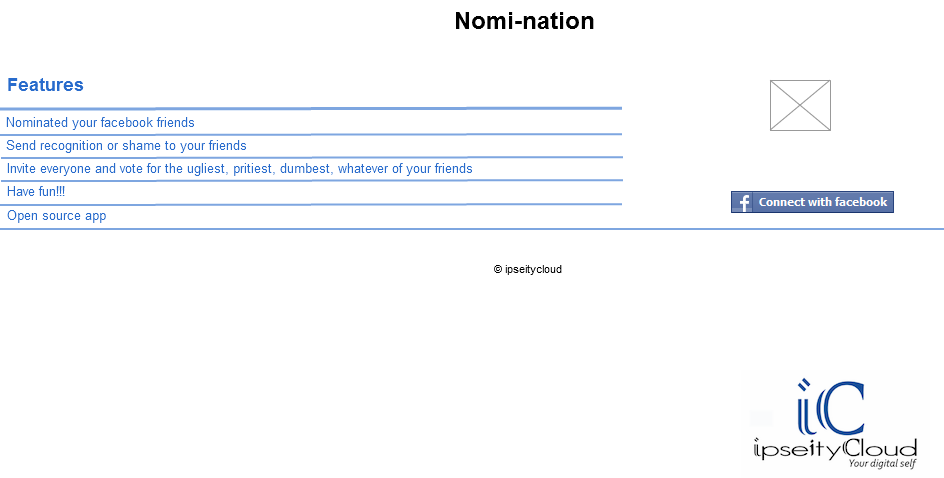
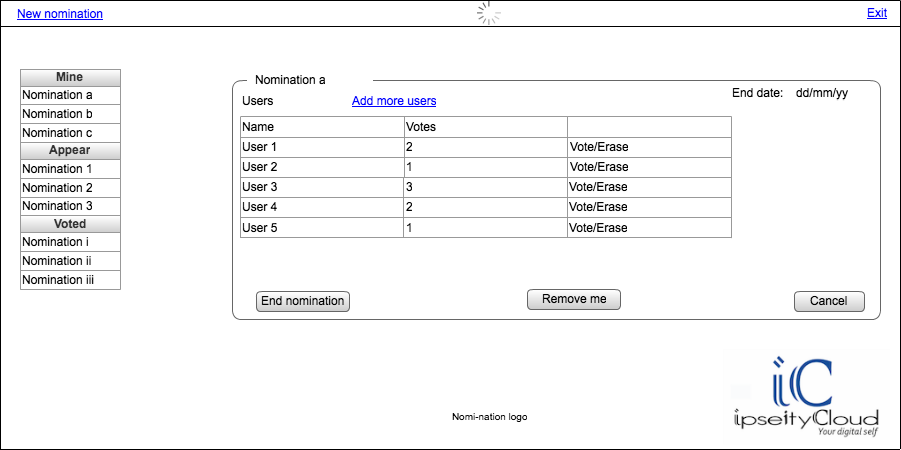
Lets see how the ui will end up, lets see the mocks i did on cacoo, this is the index


Dashboard


Good lets try to do them in jade


We are going to use the structure from html5boilerplate with the css, we are going to add some small things at the end i will show all the css added


Lets look at the "index.jade"

#header-container
    header.wrapper.clearfix
        h1.title= t('app.name')
#main-container
    #main.wrapper.clearfix
        table.att_table
            thead
                tr
                    th= t('index.features')
            tbody
                tr
                    td= t('index.feature1')
                tr
                    td= t('index.feature2')
                tr
                    td= t('index.feature3')
                tr
                    td= t('index.feature4')
                tr
                    td= t('index.feature5')
                    td
                        a(href="/login")
                            img(src="/images/cwf.png")
        - if (error)
            .error #{error}
#footer-container
    footer.wrapper
        .ficon
            img(src="/images/ipn.png")


We are adding our title a table with the features, an image to load to Facebook, a placeholder for show any error and a footer with our logo, will look like this:


"Dashboard.jade"

#header-container
    header.wrapper.clearfix
        .new
            a#nn(href="#")= t('dashboard.new_nomination')
        .loading
            img(src="/images/loading.png")
        .exit
            a(href="/logout")= t('dashboard.exit')
#main-container
    #main.wrapper.clearfix
        .nominations
            div.nheader.title #{t('dashboard.mine')}
            ul
                li
                    input(type="checkbox", checked="true")
                    label  Nomination 1
                li
                    input(type="checkbox")
                    label  Nomination 2
                li
                    input(type="checkbox")
                    label  Nomination 3
            div.title #{t('dashboard.appear')}
            ul
                li
                    input(type="checkbox")
                    label  Nomination a
                li
                    input(type="checkbox")
                    label  Nomination b
                li
                    input(type="checkbox")
                    label  Nomination d
                li
                    input(type="checkbox")
                    label  Nomination e
                li
                    input(type="checkbox")
                    label  Nomination f
                li
                    input(type="checkbox")
                    label  Nomination g
                li
                    input(type="checkbox")
                    label  Nomination h

            div.title #{t('dashboard.voted')}
            ul
                li
                    input(type="checkbox")
                    label  Nomination i
                li
                    input(type="checkbox")
                    label  Nomination ii
                li
                    input(type="checkbox")
                    label  Nomination iii
        .details
            fieldset.fs
                legend Nomination 1
                .header
                    .users #{t('dashboard.users')}
                    .add
                        a#am(href="#")#{t('dashboard.add_more')}
                    .date Date
                br
                .list
                    table.userst
                        thead
                            tr
                                th #{t('dashboard.name')}
                                th #{t('dashboard.votes')}
                                th
                        tbody
                            tr
                                td User 1
                                td 2
                                td
                                    a(href="#") #{t('dashboard.vote')}
                                    | /
                                    a(href="#") #{t('dashboard.erase')}
                            tr
                                td User 2
                                td 3
                                td
                                    a(href="#") #{t('dashboard.vote')}
                                    | /
                                    a(href="#") #{t('dashboard.erase')}
                            - for (var i =4; i                                tr
                                    td User #{i}
                                    td #{Math.floor(Math.random()*11)}
                                    td
                                        a(href="#") #{t('dashboard.vote')}
                                        | /
                                        a(href="#") #{t('dashboard.erase')}
                .btns
                    button.myButton#end #{t('dashboard.end_nomination')}
                    button.myButton#remove #{t('dashboard.remove_me')}
                    button.myButton#cancel #{t('dashboard.cancel')}
        .images
        .logo logo
        .ficon
            img(src="/images/ipn.png")
#footer-container
    footer.wrapper

#dialog-new(title="Create new nomination")
    p.validateTips All form fields are required
    form
        fieldset
            label.forml(for="name") Name:
            input#name.text.ui-widget-content.ui-corner-all(type="text", name="name")
            br
            label.forml(for="email") End date:
            input#datep.text.ui-widget-content.ui-corner-all(type="text", name="datep")

#dialog-add(title="Add friends")
    form
        fieldset
            ol#selectable
                li.ui-state-default 1
                li.ui-state-default 2
                li.ui-state-default 3
                li.ui-state-default 4
                li.ui-state-default 5
                li.ui-state-default 6


We are adding a lot of things that we are going to erase later, but its to see if this is looking ok, the only interesting thing here will be the "for" to add some users around lines 89-96, we will fill out this from the app later.


We have two lost forms at the end, but we will hide them because we will use them as dialogs with jquery-ui.


Lets update our layout to add our css and the js needed

link(rel="stylesheet", href="/stylesheets/jquery-ui.css", type="text/css")

script(defer, src="/javascripts/lib/jquery-ui.min.js")


Lets start our dialogs and a date picker, we add al this to "script.js"

    $( "#datep" ).datepicker();
    $( "#selectable" ).selectable();
    $("#nn").click(function(){
        $( "#dialog-new" ).dialog( "open" );
    });
    $("#am").click(function(){
        $( "#dialog-add" ).dialog( "open" );
    });
    $( "#dialog-new" ).dialog({
  autoOpen: false,
  height: 300,
  width: 450,
  modal: true,
  buttons: {
   "Create a nomination": function() {
    $( this ).dialog( "close" );
   },
   Cancel: function() {
    $( this ).dialog( "close" );
   }
  },
  close: function() {
   //TODO:
  }
 });
    $( "#dialog-add" ).dialog({
        autoOpen: false,
  height: 300,
  width: 450,
  modal: true,
  buttons: {
   "Add friend(s)": function() {
    $( this ).dialog( "close" );
   },
   Cancel: function() {
    $( this ).dialog( "close" );
   }
  },
  close: function() {
   //TODO:
  }
 });


Then we also one that only one checkbox can be selected at the time and also when they select a label the checkbox get selected ask, we use some query magic and add it also to "script.js"

    function checkOne(){
        var currentEl = $(this);
        $("input:checked").each(function(){
            $(this).attr('checked', false);
        });
        if (currentEl.is('input')){
            currentEl.attr('checked', true);
            return;
        }
        var checkbox = currentEl.siblings('input');
        checkbox.attr('checked', !checkbox.attr('checked'));
    }
    $(".nominations ul label").click(checkOne);
    $(".nominations ul input").click(checkOne);


Here we just listen to the click event in the checkbox and the label, we deselect the already selected and we select the current one

We end up with something like this:


and the dialogs


And the css that we are going to add is:

/* =============================================================================
   Primary styles
   Author: mrpix
   ========================================================================== */
.logo{
    text-align: center;
}
.list{
    margin-top: 20px;
}
.btns{
    margin-top: 5%;
}
#main-container{
    height: 500px;
}
#main{
    height: 100%;
}
.userst th, .userst td{
    border: 1px solid #ededed;
}
.userst th{
    background-color: #ededed
}
.userst{
    width: 95%;
}
.btns button{
    margin-left: 5%;
}
.users, .add{
    float: left;
    margin-right: 30%;
}
.date{
    float: right;
}
.nominations .title{
    background-color: #ededed;
    width: 60%;
    padding: 0 0 0 40px;
    border: 1px solid black;
    text-align: left;
}
.nominations ul{
    border: 1px solid black;
    width: 60%;
    height: 120px;
    overflow: auto;
    margin-bottom: 0;
}
.nheader{
    -webkit-border-top-left-radius: 13px;
    -webkit-border-top-right-radius: 13px;
    -moz-border-radius-topleft: 13px;
    -moz-border-radius-topright: 13px;
    border-top-left-radius: 13px;
    border-top-right-radius: 13px;
}
.nominations li{
    list-style:none;
    background-color: white;
    margin-left: 0;
    border-bottom: 1px solid #ededed;
    margin-left: -25px;
}
label{
    padding-left: 5px;
    padding-right: 5px;
}
.nominations{
    width: 30%;
    height: 90%;
    overflow: auto;
    float: left;
}
.details{
    width: 69%;
    height: 90%;
    overflow: auto;
    float: left;
}
.new{
    float: left;
}
.loading{
    text-align: center;
}
.exit{
    float: right;
    margin-top: -1.7em;
}

.copy {
    text-align: center;
}
.ficon{
 float: right;
}

.title{
 text-align: center;
}
.att_table
{

 background: #fff;
 margin: 0px 40px 3px 50px;
 width: 90%;
 border-collapse: collapse;
 text-align: left;
}
.att_table th
{

 color: #039;
 padding: 10px 8px;
 border-bottom: 2px solid #6678b1;
}
.att_table td
{
 border-bottom: 1px solid #ccc;
 color: #669;
 padding: 6px 8px;
}
.att_table tbody tr:hover td
{
 color: #00c;
}
.myButton {
    -moz-box-shadow:inset 0px 1px 0px 0px #ffffff;
 -webkit-box-shadow:inset 0px 1px 0px 0px #ffffff;
 box-shadow:inset 0px 1px 0px 0px #ffffff;
 background:-webkit-gradient( linear, left top, left bottom, color-stop(0.05, #ededed), color-stop(1, #dfdfdf) );
 background:-moz-linear-gradient( center top, #ededed 5%, #dfdfdf 100% );
 filter:progid:DXImageTransform.Microsoft.gradient(startColorstr='#ededed', endColorstr='#dfdfdf');
 background-color:#ededed;
 -moz-border-radius:6px;
 -webkit-border-radius:6px;
 border-radius:6px;
 border:1px solid #dcdcdc;
 display:inline-block;
 color:#777777;
 font-family:arial;
 font-size:15px;
 font-weight:bold;
 padding:6px 24px;
 text-decoration:none;
 text-shadow:1px 1px 0px #ffffff;
}.myButton:hover {
 background:-webkit-gradient( linear, left top, left bottom, color-stop(0.05, #dfdfdf), color-stop(1, #ededed) );
 background:-moz-linear-gradient( center top, #dfdfdf 5%, #ededed 100% );
 filter:progid:DXImageTransform.Microsoft.gradient(startColorstr='#dfdfdf', endColorstr='#ededed');
 background-color:#dfdfdf;
}.myButton:active {
 position:relative;
 top:1px;
}
#dialog-add, #dialog-new{
    display: none;
}
#selectable .ui-selecting { background: #FECA40; }
#selectable .ui-selected { background: #F39814; color: white; }
#selectable { list-style-type: none; margin: 0; padding: 0; }
#selectable li { margin: 3px; padding: 1px; float: left; width: 50px; height: 40px; font-size: 2em; text-align: center; }


If you need help understanding the css let me know in the comments

The design is not the best but we are making progress, any suggestions is welcome


Fork the code in github:


Greetings 

2.15.2012

Nomination part 7 - connecting to facebook


Version en español


This post is part of the series about creating an app with node.js, express for Facebook


Lets connect to fcebook to get the user information and store in session the tokens for request, we will only save the userid and name in the db.


For this we will use a module called "facebook-j", this module its already installed, so lets add it to our "app.js" at the beginning of the file with the other modules like this:

var fb = require('facebook-js');


And then lets add some routes, first for the login that will send to the facebook page for the user login or if its already logged in he must accept the app in order to let the app get information from the profile

    /**
     * Login page
     */
    app.get('/login', function(req, res){
        log.notice('trying to login:' + new Date());
        res.redirect(fb.getAuthorizeUrl({
            client_id: '264644053569277', //put the client id
            redirect_uri: 'http://nomi-nation.pinguxx.c9.io/auth/fb', //cambiar si es necesario
            scope: 'offline_access,publish_stream,read_stream'
        }));
    });
    /**
     * FB return
    */
    app.get('/auth/fb', function(req, res){
        log.notice('response from fb: ' + new Date());
        fb.getAccessToken('264644053569277', //clientid
            '76ded2bf195073ce7a183a1ef1cd0b8a', //app secret
            req.param('code'),
            'http://nomi-nation.pinguxx.c9.io/auth/fb', //cambiar si es necesario
            function (error, access_token, refresh_token) {
                if (error){
                    log.debug('error getting access token:' + error);
                    throw new Error('Error getting the acccess token');
                }
                log.notice('trying to get the tokens:' + new Date());
                req.session.user = {};
                req.session.user.access_token = access_token;
                req.session.user.access_token_secret = refresh_token;
                fb.apiCall('GET', '/me/', {access_token: req.session.user.access_token}, function(error, response, body){
                    if (error){
                        log.debug('error getting user info:' + error);
                        throw new Error('Error getting user information');
                    }
                    log.notice('getting info from user:' + body.id);
                    req.session.user.name = body.username;
                    req.session.user.id = body.id;
                    res.redirect('/dashboard');
                });
            }
        );
    });


Line 4-5: got the login path and log that someone is trying to access


6: we redirect to whatever Facebook api returns


7: add the client id that we got from Facebook, if you need help creating and app in Facebook let me know in the comments section


8: the "redirect_uri" its where we are going to return once the user has accepted our ap


9: the scope of our app, meaning what things are going to see from the app, we will need publish and read, we may not need to read it but for know lets leave it like that, the offline access is to read the user profile.

15 y 16: path is needed to put where to return and then we log whatever Facebook returns


17-21: we ask an access token to Facebook, we pass the "client_id" and the secrecy key of the app


22-25: if something bad happens lets report it

26-30: logging and storing in session the access token and we make another call to the api but this time to get the user information from "/me", we send the access token that we just got

31-38: check errors again, log and save the name and we redirect to the "/dashboard" path
Bien para manejar la ruta y las próximas rutas de dashboard usaremos otro archivo que le llamaremos dashboard.js en este por el momento solo declararemos la ruta principal


Lets create a file called "dashboard.js" to hold all the paths for the actual app, it will look like this:

/**
 * Rutas dashboard
*/
module.exports = function(app, log){

    /**
     * Dashboard landing
    */
    app.get('/dashboard', function(req, res){
        log.notice('landed on dashboard user: ' +
            req.session.user.id + ' on: ' + new Date() );
        res.render('dashboard', { user: req.session.user });
    });
};


Simple, just log out and send the dashboard template with the user object


lets add this dashboard routes to the "app.js" just like before, add it after index.js

require('./routes/dashboard')(app, log);


OK, our new view will be called "dashboard.jade" and right now we will show only the data that we store from Facebook

.username #{t('dashboard.user_name')}: #{user.name}
.userid #{t('dashboard.user_id')}: #{user.id}


Using our i18next module we add the name and the id, so we just need to update the "translation.json" for all the languages

    "dashboard":{
        "user_name" : "Nombre del usuario",
        "user_id" : "Id del usuario"
    }


And we are set, our app is now connected to Facebook and downloading info from there, in later posts you will see how to get other information

Fork the code in github:


Greetings