Version en español
This post is part of the series about creating an app with node.js, express for Facebook
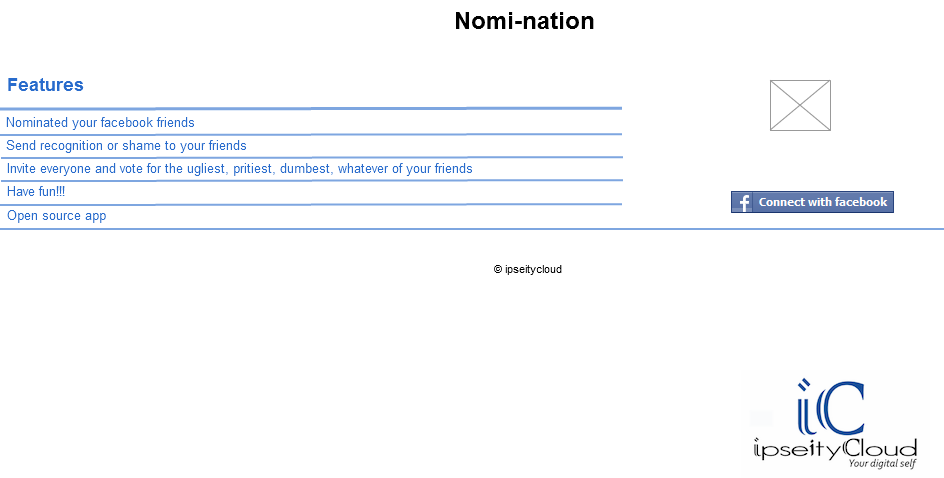
Lets see how the ui will end up, lets see the mocks i did on cacoo, this is the index
Dashboard
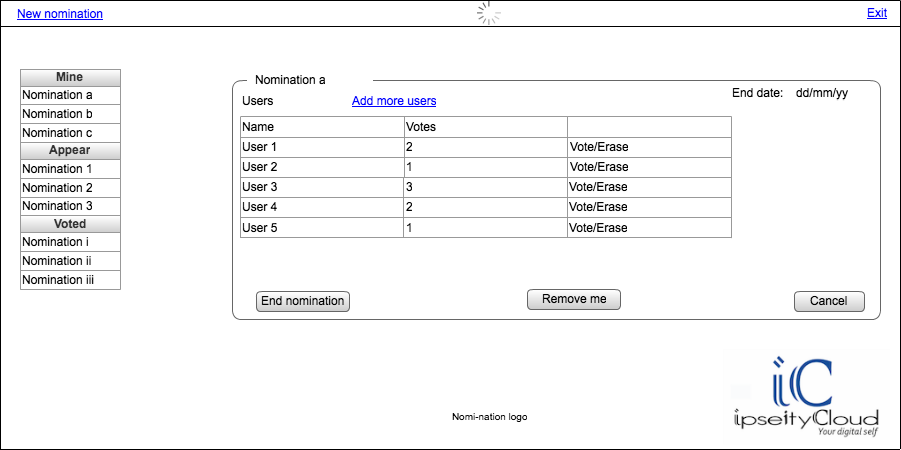
Good lets try to do them in jade
We are going to use the structure from html5boilerplate with the css, we are going to add some small things at the end i will show all the css added
Lets look at the "index.jade"
#header-container
    header.wrapper.clearfix
        h1.title= t('app.name')
#main-container
    #main.wrapper.clearfix
        table.att_table
            thead
                tr
                    th= t('index.features')
            tbody
                tr
                    td= t('index.feature1')
                tr
                    td= t('index.feature2')
                tr
                    td= t('index.feature3')
                tr
                    td= t('index.feature4')
                tr
                    td= t('index.feature5')
                    td
                        a(href="/login")
                            img(src="/images/cwf.png")
        - if (error)
            .error #{error}
#footer-container
    footer.wrapper
        .ficon
            img(src="/images/ipn.png")
We are adding our title a table with the features, an image to load to Facebook, a placeholder for show any error and a footer with our logo, will look like this:

"Dashboard.jade"
#header-container
    header.wrapper.clearfix
        .new
            a#nn(href="#")= t('dashboard.new_nomination')
        .loading
            img(src="/images/loading.png")
        .exit
            a(href="/logout")= t('dashboard.exit')
#main-container
    #main.wrapper.clearfix
        .nominations
            div.nheader.title #{t('dashboard.mine')}
            ul
                li
                    input(type="checkbox", checked="true")
                    label  Nomination 1
                li
                    input(type="checkbox")
                    label  Nomination 2
                li
                    input(type="checkbox")
                    label  Nomination 3
            div.title #{t('dashboard.appear')}
            ul
                li
                    input(type="checkbox")
                    label  Nomination a
                li
                    input(type="checkbox")
                    label  Nomination b
                li
                    input(type="checkbox")
                    label  Nomination d
                li
                    input(type="checkbox")
                    label  Nomination e
                li
                    input(type="checkbox")
                    label  Nomination f
                li
                    input(type="checkbox")
                    label  Nomination g
                li
                    input(type="checkbox")
                    label  Nomination h

            div.title #{t('dashboard.voted')}
            ul
                li
                    input(type="checkbox")
                    label  Nomination i
                li
                    input(type="checkbox")
                    label  Nomination ii
                li
                    input(type="checkbox")
                    label  Nomination iii
        .details
            fieldset.fs
                legend Nomination 1
                .header
                    .users #{t('dashboard.users')}
                    .add
                        a#am(href="#")#{t('dashboard.add_more')}
                    .date Date
                br
                .list
                    table.userst
                        thead
                            tr
                                th #{t('dashboard.name')}
                                th #{t('dashboard.votes')}
                                th
                        tbody
                            tr
                                td User 1
                                td 2
                                td
                                    a(href="#") #{t('dashboard.vote')}
                                    | /
                                    a(href="#") #{t('dashboard.erase')}
                            tr
                                td User 2
                                td 3
                                td
                                    a(href="#") #{t('dashboard.vote')}
                                    | /
                                    a(href="#") #{t('dashboard.erase')}
                            - for (var i =4; i                                tr
                                    td User #{i}
                                    td #{Math.floor(Math.random()*11)}
                                    td
                                        a(href="#") #{t('dashboard.vote')}
                                        | /
                                        a(href="#") #{t('dashboard.erase')}
                .btns
                    button.myButton#end #{t('dashboard.end_nomination')}
                    button.myButton#remove #{t('dashboard.remove_me')}
                    button.myButton#cancel #{t('dashboard.cancel')}
        .images
        .logo logo
        .ficon
            img(src="/images/ipn.png")
#footer-container
    footer.wrapper

#dialog-new(title="Create new nomination")
    p.validateTips All form fields are required
    form
        fieldset
            label.forml(for="name") Name:
            input#name.text.ui-widget-content.ui-corner-all(type="text", name="name")
            br
            label.forml(for="email") End date:
            input#datep.text.ui-widget-content.ui-corner-all(type="text", name="datep")

#dialog-add(title="Add friends")
    form
        fieldset
            ol#selectable
                li.ui-state-default 1
                li.ui-state-default 2
                li.ui-state-default 3
                li.ui-state-default 4
                li.ui-state-default 5
                li.ui-state-default 6
We are adding a lot of things that we are going to erase later, but its to see if this is looking ok, the only interesting thing here will be the "for" to add some users around lines 89-96, we will fill out this from the app later.
We have two lost forms at the end, but we will hide them because we will use them as dialogs with jquery-ui.
Lets update our layout to add our css and the js needed
link(rel="stylesheet", href="/stylesheets/jquery-ui.css", type="text/css")
script(defer, src="/javascripts/lib/jquery-ui.min.js")
Lets start our dialogs and a date picker, we add al this to "script.js"
    $( "#datep" ).datepicker();
    $( "#selectable" ).selectable();
    $("#nn").click(function(){
        $( "#dialog-new" ).dialog( "open" );
    });
    $("#am").click(function(){
        $( "#dialog-add" ).dialog( "open" );
    });
    $( "#dialog-new" ).dialog({
  autoOpen: false,
  height: 300,
  width: 450,
  modal: true,
  buttons: {
   "Create a nomination": function() {
    $( this ).dialog( "close" );
   },
   Cancel: function() {
    $( this ).dialog( "close" );
   }
  },
  close: function() {
   //TODO:
  }
 });
    $( "#dialog-add" ).dialog({
        autoOpen: false,
  height: 300,
  width: 450,
  modal: true,
  buttons: {
   "Add friend(s)": function() {
    $( this ).dialog( "close" );
   },
   Cancel: function() {
    $( this ).dialog( "close" );
   }
  },
  close: function() {
   //TODO:
  }
 });
Then we also one that only one checkbox can be selected at the time and also when they select a label the checkbox get selected ask, we use some query magic and add it also to "script.js"
    function checkOne(){
        var currentEl = $(this);
        $("input:checked").each(function(){
            $(this).attr('checked', false);
        });
        if (currentEl.is('input')){
            currentEl.attr('checked', true);
            return;
        }
        var checkbox = currentEl.siblings('input');
        checkbox.attr('checked', !checkbox.attr('checked'));
    }
    $(".nominations ul label").click(checkOne);
    $(".nominations ul input").click(checkOne);
Here we just listen to the click event in the checkbox and the label, we deselect the already selected and we select the current one
We end up with something like this:

and the dialogs


And the css that we are going to add is:
/* =============================================================================
   Primary styles
   Author: mrpix
   ========================================================================== */
.logo{
    text-align: center;
}
.list{
    margin-top: 20px;
}
.btns{
    margin-top: 5%;
}
#main-container{
    height: 500px;
}
#main{
    height: 100%;
}
.userst th, .userst td{
    border: 1px solid #ededed;
}
.userst th{
    background-color: #ededed
}
.userst{
    width: 95%;
}
.btns button{
    margin-left: 5%;
}
.users, .add{
    float: left;
    margin-right: 30%;
}
.date{
    float: right;
}
.nominations .title{
    background-color: #ededed;
    width: 60%;
    padding: 0 0 0 40px;
    border: 1px solid black;
    text-align: left;
}
.nominations ul{
    border: 1px solid black;
    width: 60%;
    height: 120px;
    overflow: auto;
    margin-bottom: 0;
}
.nheader{
    -webkit-border-top-left-radius: 13px;
    -webkit-border-top-right-radius: 13px;
    -moz-border-radius-topleft: 13px;
    -moz-border-radius-topright: 13px;
    border-top-left-radius: 13px;
    border-top-right-radius: 13px;
}
.nominations li{
    list-style:none;
    background-color: white;
    margin-left: 0;
    border-bottom: 1px solid #ededed;
    margin-left: -25px;
}
label{
    padding-left: 5px;
    padding-right: 5px;
}
.nominations{
    width: 30%;
    height: 90%;
    overflow: auto;
    float: left;
}
.details{
    width: 69%;
    height: 90%;
    overflow: auto;
    float: left;
}
.new{
    float: left;
}
.loading{
    text-align: center;
}
.exit{
    float: right;
    margin-top: -1.7em;
}

.copy {
    text-align: center;
}
.ficon{
 float: right;
}

.title{
 text-align: center;
}
.att_table
{

 background: #fff;
 margin: 0px 40px 3px 50px;
 width: 90%;
 border-collapse: collapse;
 text-align: left;
}
.att_table th
{

 color: #039;
 padding: 10px 8px;
 border-bottom: 2px solid #6678b1;
}
.att_table td
{
 border-bottom: 1px solid #ccc;
 color: #669;
 padding: 6px 8px;
}
.att_table tbody tr:hover td
{
 color: #00c;
}
.myButton {
    -moz-box-shadow:inset 0px 1px 0px 0px #ffffff;
 -webkit-box-shadow:inset 0px 1px 0px 0px #ffffff;
 box-shadow:inset 0px 1px 0px 0px #ffffff;
 background:-webkit-gradient( linear, left top, left bottom, color-stop(0.05, #ededed), color-stop(1, #dfdfdf) );
 background:-moz-linear-gradient( center top, #ededed 5%, #dfdfdf 100% );
 filter:progid:DXImageTransform.Microsoft.gradient(startColorstr='#ededed', endColorstr='#dfdfdf');
 background-color:#ededed;
 -moz-border-radius:6px;
 -webkit-border-radius:6px;
 border-radius:6px;
 border:1px solid #dcdcdc;
 display:inline-block;
 color:#777777;
 font-family:arial;
 font-size:15px;
 font-weight:bold;
 padding:6px 24px;
 text-decoration:none;
 text-shadow:1px 1px 0px #ffffff;
}.myButton:hover {
 background:-webkit-gradient( linear, left top, left bottom, color-stop(0.05, #dfdfdf), color-stop(1, #ededed) );
 background:-moz-linear-gradient( center top, #dfdfdf 5%, #ededed 100% );
 filter:progid:DXImageTransform.Microsoft.gradient(startColorstr='#dfdfdf', endColorstr='#ededed');
 background-color:#dfdfdf;
}.myButton:active {
 position:relative;
 top:1px;
}
#dialog-add, #dialog-new{
    display: none;
}
#selectable .ui-selecting { background: #FECA40; }
#selectable .ui-selected { background: #F39814; color: white; }
#selectable { list-style-type: none; margin: 0; padding: 0; }
#selectable li { margin: 3px; padding: 1px; float: left; width: 50px; height: 40px; font-size: 2em; text-align: center; }
If you need help understanding the css let me know in the comments
The design is not the best but we are making progress, any suggestions is welcome